Introduction
In today's fast-paced world, managing the deluge of incoming calls has become an essential skill, particularly as spam and robocalls proliferate. The call screening feature on iPhone presents a powerful solution, enabling users to filter out unwanted communications and prioritize genuine contacts. But how can one effectively harness this technology to enhance communication efficiency and achieve peace of mind? This article delves into the setup, functionality, and troubleshooting of call screening on iPhone, revealing how users can reclaim control over their phone interactions while navigating the challenges of modern communication.
Explore the Purpose of Call Screening on iPhone
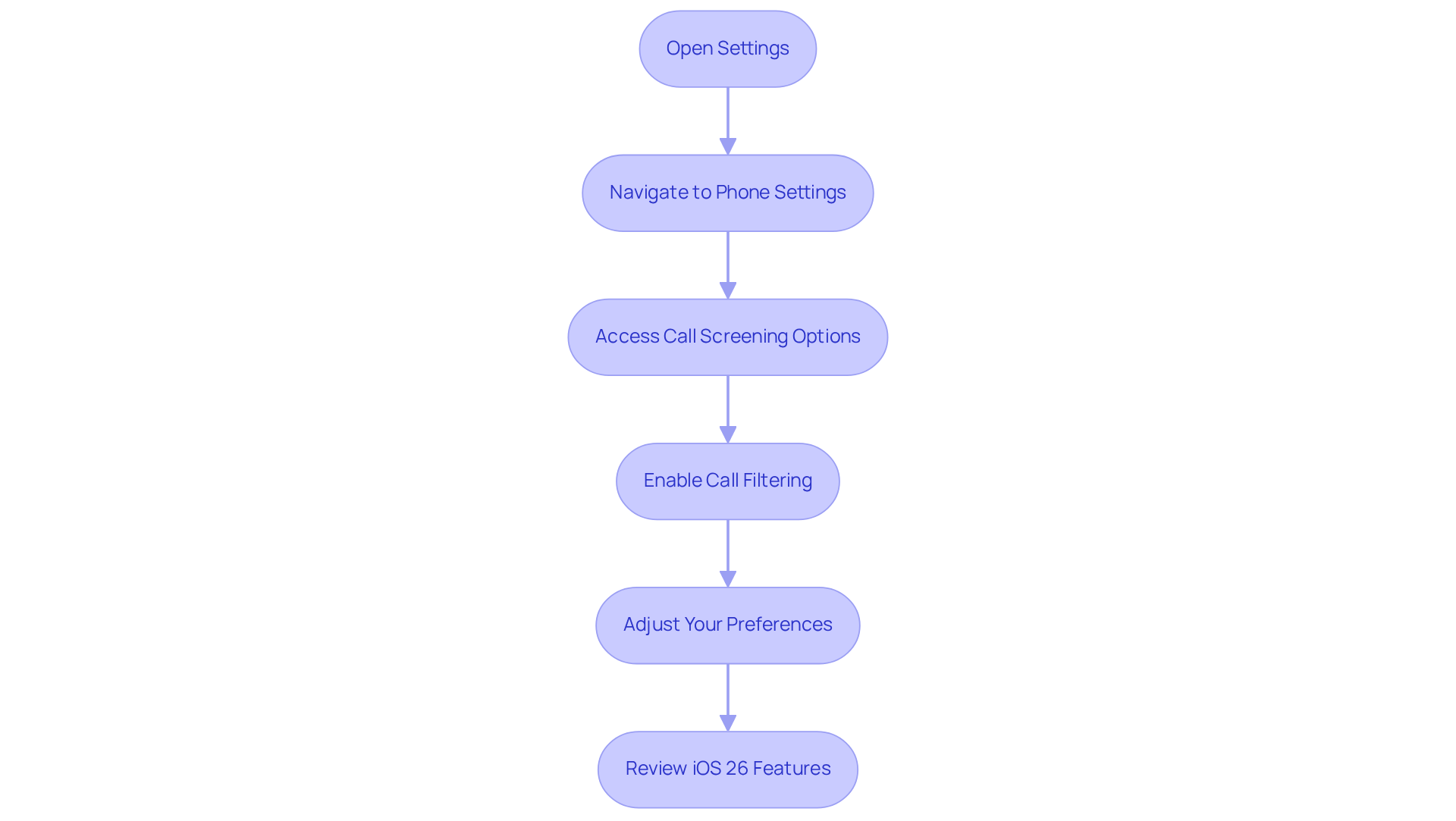
Managing incoming communication effectively on iPhone is greatly enhanced by , particularly when dealing with unknown or spam numbers. With the surge of robocalls and unsolicited promotions, individuals increasingly face an overwhelming volume of unwanted communications. The feature adeptly categorizes these interactions, allowing users to engage solely with authentic contacts. By using to automatically address inquiries from unfamiliar numbers and prompting the caller to clarify their purpose, users can make informed decisions on whether to respond or disregard the communication. This not only conserves valuable time but also significantly boosts overall productivity and peace of mind.
Moreover, the integration of Intone's markedly elevates . These agents provide for frequently asked questions, order tracking, and password resets, even during after-hours or peak periods. Such functionality not only enhances but also improves , enabling sales teams to focus on high-priority tasks without the burden of managing every incoming communication. In summary, transcends mere convenience; it is an essential strategy for anyone seeking to and .
Set Up Call Screening on Your iPhone
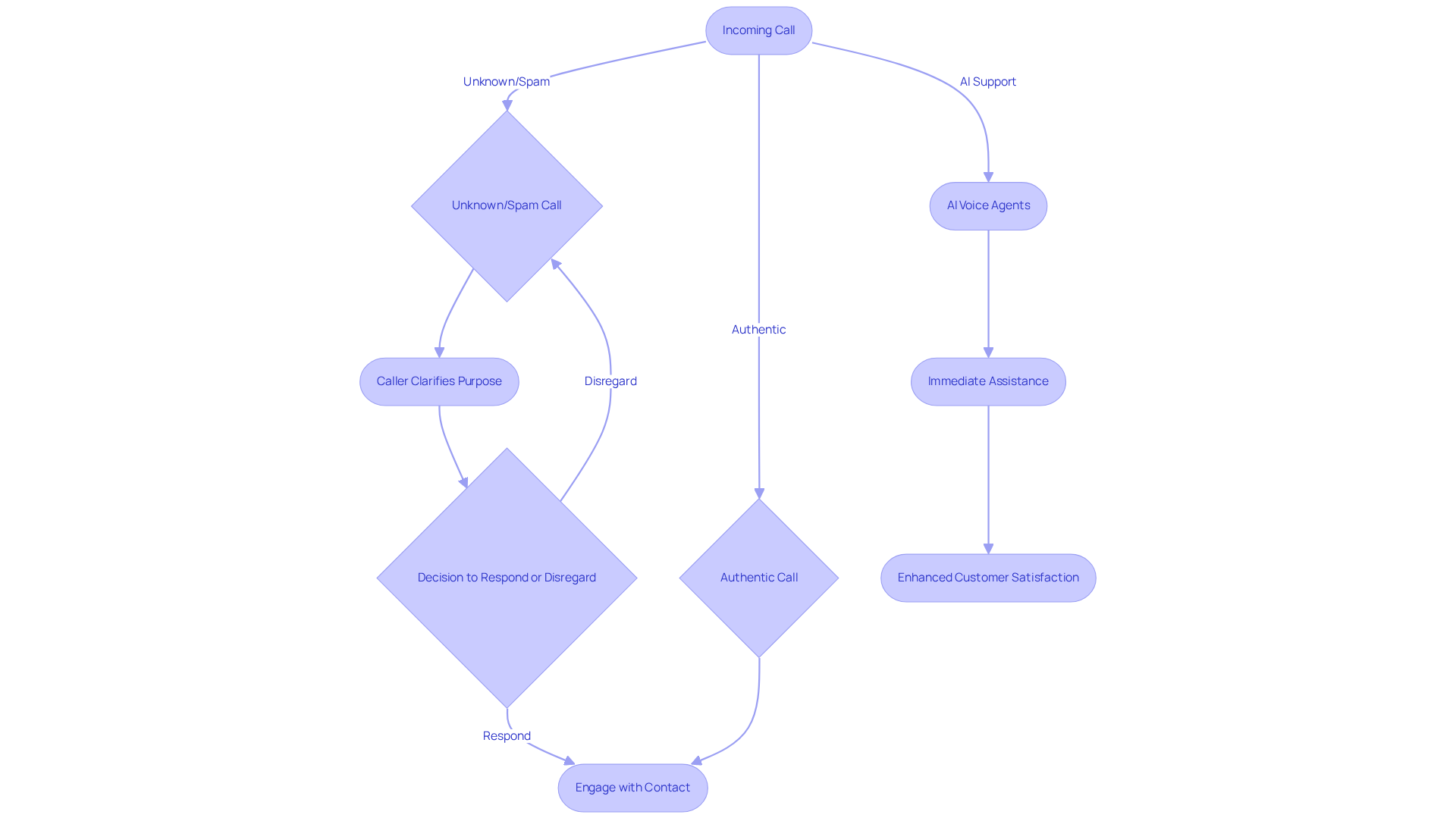
To set up on your iPhone, follow these essential steps:
- Open Settings: Begin by tapping on the Settings application on your device.
- Navigate to Phone Settings: Scroll down and select 'Phone'.
- Access options: Locate the '' section.
- Enable Call Filtering: Toggle the switch to activate the filtering of incoming communications. You will encounter options such as '', 'Silence', or 'Never'. Choose your preferred setting.
- Adjust Your Preferences: If you opt for '', your iPhone will prompt unknown callers to state their name and the purpose of their communication before you decide to respond.
With the latest iOS 26 update, has evolved into an automatic procedure, allowing individuals to manage incoming calls with greater efficiency. Notably, when an unidentified caller contacts you, there is no initial ringing; instead, an under 30 seconds for the conversation to be answered. A notification appears on the , displaying the caller's name, number, and a brief transcript, thereby . This feature has witnessed a significant rise in adoption rates, as it greatly reduces interruptions from unwanted callers. By personalizing your phone filtering preferences, you can enhance your strategy, ensuring that important calls are prioritized while minimizing disruptions. Furthermore, the communication filtering feature supports multiple languages, making it accessible to a diverse audience.
Understand How Call Screening Works in iOS 26
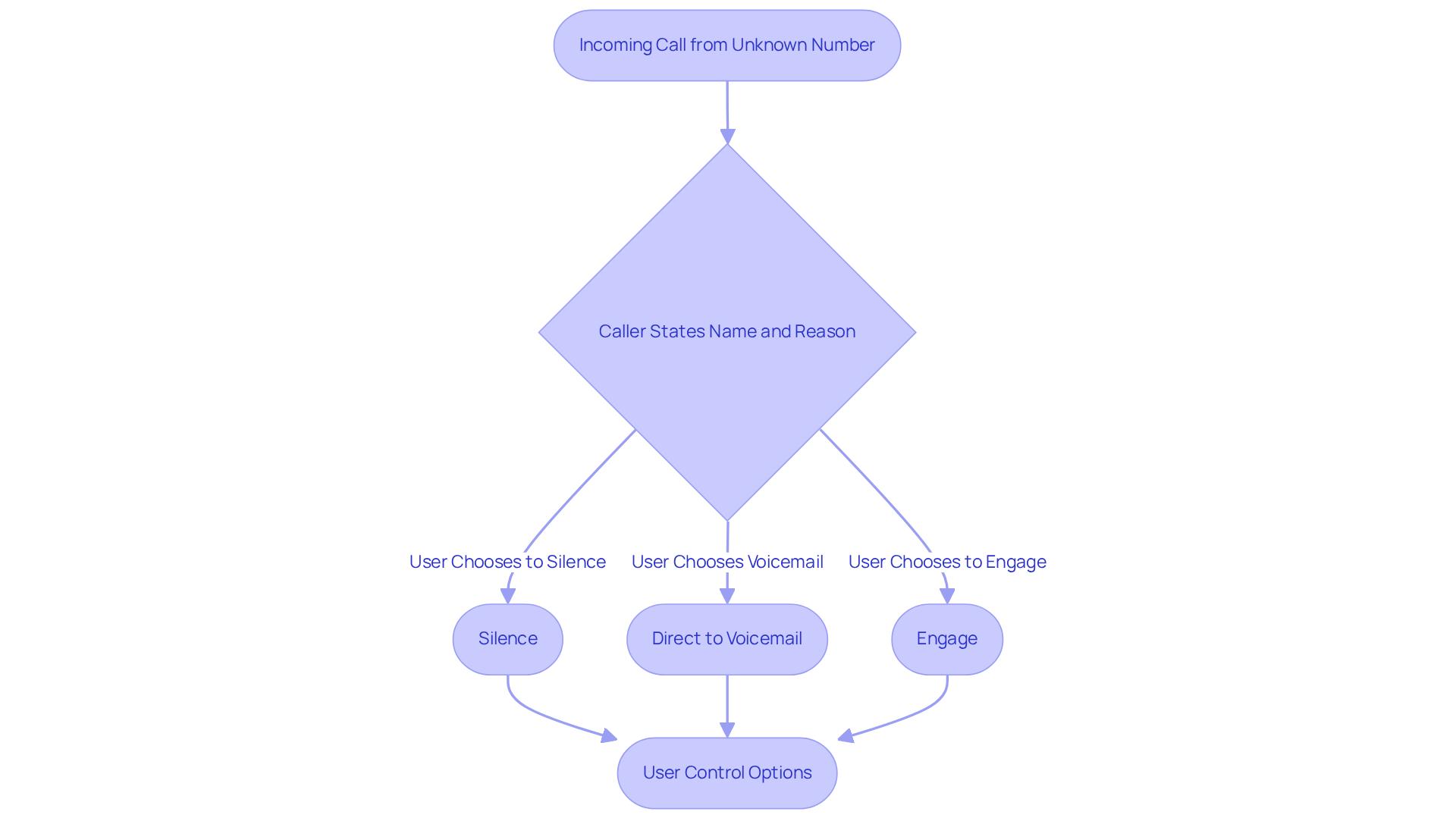
In , the significantly enhances by automatically responding to inquiries from unfamiliar numbers. Upon receiving a communication, the iPhone prompts the caller to and the reason for their contact. This crucial information is then conveyed to the user, empowering them to determine whether to accept or reject the request. The utilizes designed to differentiate between genuine communications and potential spam, effectively .
Furthermore, users can . They have the option to:
- Silence these calls
- Direct them to voicemail
- Engage based on the information provided by the caller
This intelligent system not only enhances but also optimizes overall , reflecting the advancements in technology related to filtering as of 2025. By integrating these capabilities, represents a in , aligning with the needs of modern users.
Troubleshoot Call Screening Issues on iPhone
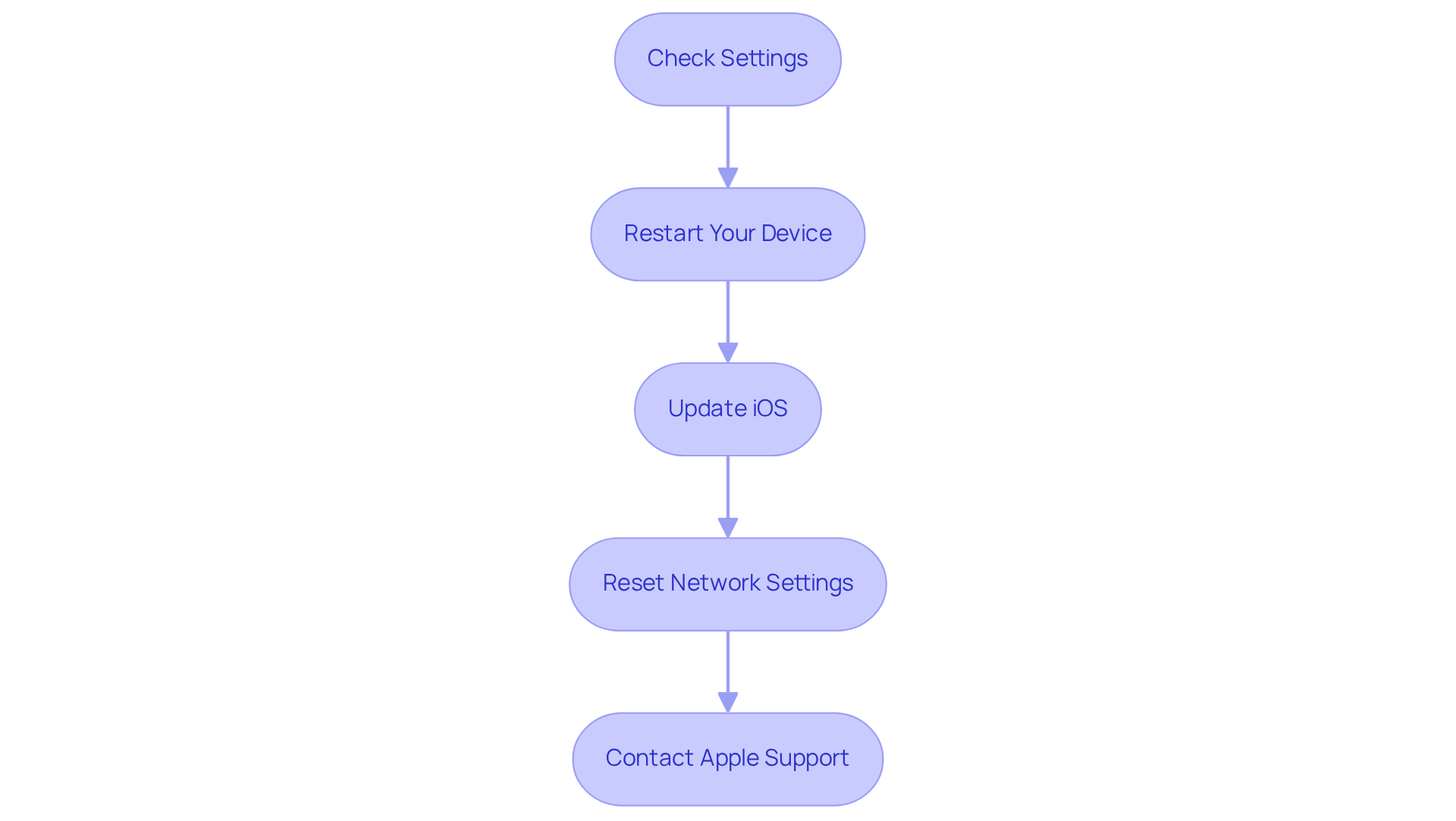
If you encounter issues with on your iPhone, follow these to :
- Check Settings: Confirm that is enabled. Navigate to Settings > Phone > enable iPhone to screen unknown callers and ensure the feature is activated.
- Restart Your Device: A simple reboot can often fix minor issues. Hold the power button, slide to power off, and then turn your device back on.
- Update iOS: Ensure your iPhone is running the . Go to Settings > General > Software Update to check for any available updates. Numerous users have discovered that upgrading to iOS 26.0.1 fixes typical problems.
- : If the communication filter remains unresponsive, consider resetting your network settings. Go to Settings > General > Reset > . Be aware that this action will erase saved Wi-Fi passwords.
- : Should problems persist, reach out to Apple Support for tailored assistance. They can provide specific guidance based on your device and software version.
Statistics indicate that U.S. consumers receive about 4 billion robocalls monthly, leading 87% of Americans to avoid unknown numbers. This emphasizes the significance of for companies aiming to engage with . Frequent causes for phone filtering problems consist of outdated iOS versions, carrier restrictions, and temporary software glitches. By implementing these , you can address common issues and ensure your iPhone feature operates smoothly, ultimately improving your outreach effectiveness.
Conclusion
Mastering call screening on the iPhone streamlines communication and empowers users to take control of their incoming calls. By effectively managing unknown or spam numbers, individuals can focus on meaningful interactions while minimizing unwanted interruptions. The call screening feature is a vital tool in today's digital landscape, enhancing productivity and ensuring peace of mind.
Throughout this article, we explored key insights into the setup, functionality, and troubleshooting of call screening on the iPhone. Users learned how to:
- Enable this feature
- Customize their preferences
- Utilize the advanced capabilities introduced in iOS 26
The integration of AI voice agents and the ability to filter calls based on user-defined criteria were highlighted as significant advancements that enhance the overall communication experience.
As the volume of robocalls continues to rise, the importance of effective call screening cannot be overstated. By adopting these strategies and utilizing the tools available, users can safeguard their time and privacy. Embracing call screening not only improves individual communication management but also fosters a more efficient and focused approach to handling phone interactions in an increasingly noisy world.
Frequently Asked Questions
What is the purpose of call screening on iPhone?
The purpose of call screening on iPhone is to manage incoming communication effectively, particularly for unknown or spam numbers, by categorizing interactions and allowing users to engage only with authentic contacts.
How does call screening help users?
Call screening helps users by automatically addressing inquiries from unfamiliar numbers, prompting the caller to clarify their purpose, which allows users to make informed decisions on whether to respond or disregard the communication.
What are the benefits of using call screening on iPhone?
The benefits of using call screening on iPhone include conserving valuable time, boosting overall productivity, and providing peace of mind by reducing the volume of unwanted communications.
How does Intone's AI voice agents enhance call screening?
Intone's 24/7 AI voice agents enhance call screening by providing immediate assistance for frequently asked questions, order tracking, and password resets, even during after-hours or peak periods.
What impact does call screening have on customer service?
Call screening improves customer service by enhancing customer satisfaction and sales efficiency, allowing sales teams to focus on high-priority tasks without the burden of managing every incoming communication.
Why is call screening considered an essential strategy?
Call screening is considered an essential strategy for anyone seeking to refine their communication processes and enhance productivity, especially in the face of increasing robocalls and unsolicited promotions.
List of Sources
- Explore the Purpose of Call Screening on iPhone
- NextGen Healthcare: Case Study on Enterprise Efficiency - GitClear (https://gitclear.com/case_studies/nextgen_healthcare)
- More time for achieving business goals through efficientcorporate communication. - Cloudica Group (https://cloudicagroup.com/case_studies/more-time-for-achievingbusiness-goals-through-efficientcorporate-communication)
- forneyvault.com (https://forneyvault.com/case_studies/braun-intertec)
- Set Up Call Screening on Your iPhone
- tomsguide.com (https://tomsguide.com/phones/iphones/ios-26-call-screening-promises-to-keep-spam-callers-at-bay-heres-how-to-set-it-up)
- businessinsider.com (https://businessinsider.com/how-to-use-iphone-call-screening-apple-ios-26-update-2025-9)
- blog.clickpointsoftware.com (https://blog.clickpointsoftware.com/apples-call-screening-adds-a-new-layer-to-iphone-calls)
- techradar.com (https://techradar.com/phones/iphone/call-screening-in-ios-26-has-finally-ended-my-spam-call-nightmare-heres-how-to-set-it-up)
- Understand How Call Screening Works in iOS 26
- 35 Quotes About the Power of Mobile Technology (https://deliberatedirections.com/quotes-about-mobile-technology)
- Troubleshoot Call Screening Issues on iPhone
- news.designrush.com (https://news.designrush.com/cold-calls-warm-intros-how-brands-adapt-to-apple-call-screening)
- techradar.com (https://techradar.com/phones/iphone/call-screening-in-ios-26-has-finally-ended-my-spam-call-nightmare-heres-how-to-set-it-up)
- howtoisolve.com (https://howtoisolve.com/fix-iphone-call-screening-not-working-or-showing)